Compatible with Chrome and Edge
Instruction Guide
We have a simple tutorial guide which explains the features of the software extension and what each button inside the extension does. Read our tutorial and welcome guide on how to use the extension to the fullest. Use all the features of this browser software.
If you are interested in other web extensions to install, you might wish to check out the Microsoft Bing Search with Rewards extension.
Microsoft Bing Search with Rewards Extension
It allows you to complete daily offers to get points.
Track the number of points you have currently and the rewards you can redeem with these points.
The ways to get points & get rewarded is search with Bing, browse with Microsoft Edge and shop at the Microsoft and Windows stores to earn rewards.
Sponsored Link:
Other useful extensions
Another extension which would be useful to install is the iCloud bookmarks extension.
It allows to keep your Chrome bookmarks on Windows synced up with the Safari bookmarks on your iPhone, iPad, and Mac.
iCloud will store your website bookmarks so it is accessible even on your iPhone and Mac.
Try these other two extensions and see if it will boost your daily productivity.
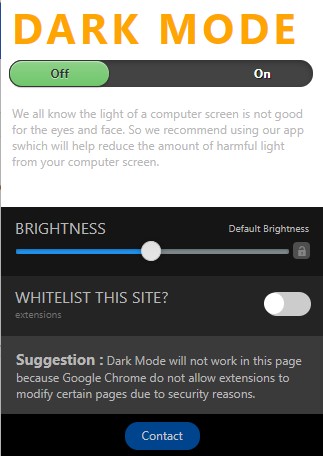
You can switch dark mode on/off with the click of a button Work on all websites.
Features:
Install and open.
- After installing the extension. You click on the icon to switch dark mode on/off.
Dark mode is a feature that makes your screen darker when it's turned on. It can be used as a night mode or a way to save battery life.
When you turn on Dark Mode, the color of the text and background will change to black instead of white.
Why use Dark Mode?
Dark mode is designed to reduce eye strain and make your phone easier on the eyes at night. It's also easier on your battery because it uses less power than normal mode does.
What are the benefits to dark mode?
Dark mode is a way to make your eyes more comfortable when using your phone or computer at night. This is especially useful for people who work late and need to use their devices while in bed. Dark mode also helps reduce eye strain, which can help you sleep better at night. A bonus is that dark mode looks cool! Here's what you can expect from dark mode:
Dark Mode Can Help You Sleep Better
Dark modes are usually dark gray or black, which means they don't emit any light. This means they won't interfere with your circadian rhythm, which controls the sleep cycle and body temperature. The bright light emitted from your screen can disrupt this rhythm by tricking your brain into thinking it's daytime. So if you're having trouble sleeping because of an e-reader or tablet with a white background, try changing it to a darker theme instead.
Dark Mode Can Reduce Eye Strain
One of the biggest benefits of dark modes is that they reduce eye strain — especially at night when you're trying to catch some shut-eye after working all day on your computer or smartphone. The bright white backgrounds on most apps and sites can be hard on your eyes and cause headaches after prolonged use.
Tutorial:
- Install the Extension
- After installing the extension, click on the icon on the toolbar.
Sponsored Link: